How To Change Status Bar or Notification Panel on Android (No root)
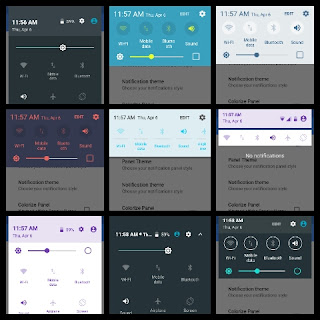
How to change status bar or notification panel on Android (No root) Every android phone comes with a status bar/notification panel, now if you want to change change the status bar then you need rooted device, but we all know that rooting your device is risky & this can damage your device. So, if you want to change this without root then follow the steps below.. 1. First download & install Material Status bar pro from the link given below. Material Status bar pro - DOWNLOAD 2. Now open the app & enable Accessibility & Notification access on the app. 3. Now tap on left corner & go to customize & tick Show battery percentage. 4. Tap on left corner & go to Notification Panel & select Enable Notification panel. 5. Now your notification panel is changed. 6. You can change notification panel themes as you want. This is the screenshot of some themes.